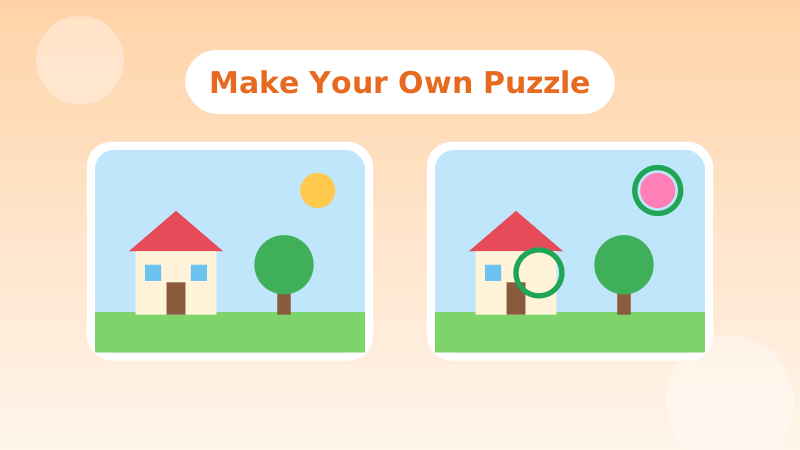
Making a spot-the-difference puzzle is a great project for a rainy afternoon, a classroom activity, or a personalised birthday party game. It is also the best way to understand why good puzzles are hard to solve. This guide covers three methods: drawing by hand, editing a photo, and designing a puzzle for a specific age. It ends with the design rules we follow when we make levels for Diffora.
1 Method one: draw it by hand
You need paper, a pencil, a black pen, colouring pens or pencils, and access to a photocopier, scanner or a sunny window.
- Draw a simple scene in pencil. A street, a park, a kitchen, an underwater scene. Aim for ten to twenty distinct objects. Too few and there is nowhere to hide differences; too many and young players get lost.
- Go over the lines in pen. Clean outlines make copying easier.
- Make an identical copy. Photocopy or scan the line drawing twice. No copier? Tape the drawing to a window, put a fresh sheet on top, and trace it in daylight.
- Add your differences to one copy only. Erase a detail, add a small object, change a shape. Keep a list as you go. It is easy to forget one!
- Colour both pictures. Colour them the same, except for one or two deliberate colour differences. Do colour changes last so you don't accidentally create extras.
- Test it on someone. Watch where they struggle. If nobody finds a difference, it may be too small; if everyone finds them all in ten seconds, make the next one harder.
2 Method two: edit a photo
Photo puzzles feel more "real" and are often harder because of all the natural detail. Any phone or computer photo editor with a clone or "remove" tool will do.
- Choose a busy, well-lit photo. Market stalls, bookshelves, gardens and street scenes work well. Avoid blurry or very dark photos: differences in shadows are frustrating rather than fun.
- Duplicate the image so you always keep an untouched original.
- Remove objects with a remove or clone tool. A sign, a bird, a window, a stripe on an awning.
- Change colours by selecting one object and adjusting its hue. Change just that object, not the whole picture.
- Copy and move small objects, such as a flower, a cup or a leaf, to a slightly different place, or flip one horizontally.
- Zoom out and check. Every edit should look natural. A blurry smudge where an object used to be gives the game away immediately.
- Save both images at the same size and place them side by side, or one above the other on a phone.
3 Choosing the right number of differences
- Ages 3 to 5: three to five large, obvious changes, such as a missing object or a whole object in a new colour.
- Ages 6 to 9: five to seven changes, mixing easy and medium.
- Ages 10 and adults: seven to ten changes, including a couple of really subtle ones.
4 Types of difference to use
A good puzzle mixes several kinds of change, so players have to switch between different ways of looking:
- Missing: something present in one picture is gone in the other.
- Added: a new object appears.
- Colour: the same object in a different colour.
- Shape or size: a longer tail, a bigger window, a rounder hat.
- Position or direction: an object moved, or an animal facing the other way.
- Count: four buttons instead of three, one fewer stripe.
- Pattern: spots turned into stripes, or a missing tile in a floor.
5 Design rules that make puzzles fair
When we build Diffora levels, a few rules help keep puzzles challenging without being annoying:
- Spread differences around. Don't cluster them all in one corner. Players should be rewarded for checking the whole picture.
- Make each difference clearly separate. If two changes touch, players may tap one and feel cheated when it only counts once.
- A difference should be visible, not microscopic. A change of a few pixels on a phone screen isn't a puzzle, it's an eye test.
- Avoid accidental differences. Uneven cropping, a slight shift of the whole image or a change in brightness will confuse players. Check that only your intended changes are different.
- Include one or two "gimmes". An easy first find gets players started and builds confidence.
- Keep an answer key. Circle the differences on a third copy so anyone stuck can check.
6 Using your puzzle
Homemade puzzles work brilliantly as party activities, classroom warm-ups, holiday cards or a surprise in a lunchbox. Turn it into a team challenge or a timed race. For more ideas, see our list of spot-the-difference games for families, and teachers might like our classroom guide.
And when you want a puzzle you didn't make yourself, there is always a fresh one waiting in Diffora's free online game.